⚠️ SpicyChat AI is an 18+ adult platform. Download only from official app stores. Third-party APK sources carry documented security risks.
Spicy Chat AI App: How to Download on Android, iOS & Web (2026)
Our investigation into SpicyChat AI's app ecosystem turned up a recurring problem: a significant portion of the search traffic around "SpicyChat AI download" leads to unofficial third-party APK sites distributing modified files. Some of these files are straightforward malware. The risk is real, specific, and avoidable — the legitimate app is free on both major app stores.
This guide documents exactly where to get the official SpicyChat AI app, the version numbers and device requirements you need, and what each access method actually delivers. We also address the mod APK situation directly, because the misleading claims on those sites deserve a clear rebuttal.
Is There a SpicyChat AI App?
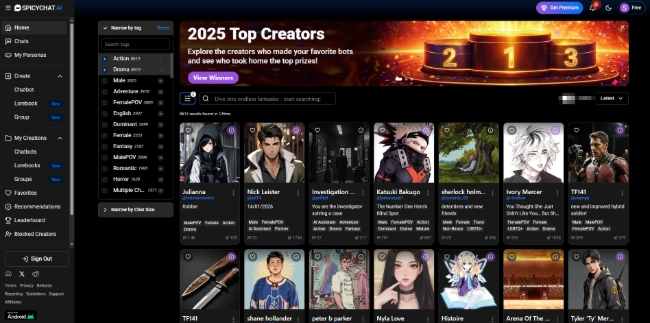
Yes. SpicyChat AI has native apps on both Android (Google Play Store) and iOS (Apple App Store), plus full web access at spicychat.ai. The platform was web-only for its first year of operation — the native mobile apps arrived after the platform had already established its user base. As of early 2026, both apps are current and actively maintained by NextDay AI Incorporated.
The native apps are not simply mobile browser wrappers. They offer push notifications, a slightly optimized mobile interface, and in-app purchase capabilities that align with each platform's payment infrastructure. The web experience at spicychat.ai is also fully mobile-responsive and can be saved to a home screen as a Progressive Web App (PWA), which functions like a native app without requiring an App Store download.
How to Download SpicyChat AI on Android
The Android app is available through the official Google Play Store. Here are the verified details as of May 2026:
- Package ID: ai.nextday.mobile.android.spicychat
- Current version: 1.0.79
- Minimum Android version: 7.0 (Nougat) or higher
- Developer name listed: NextDay AI Incorporated
Step-by-step download process:
- Open the Google Play Store on your Android device
- Search for "SpicyChat AI" in the search bar
- Locate the app published by NextDay AI — verify the developer name before installing
- Tap "Install" — the app is free to download
- Once installed, open the app and sign in or create an account
- Age verification will be prompted if your account or device region triggers the requirement
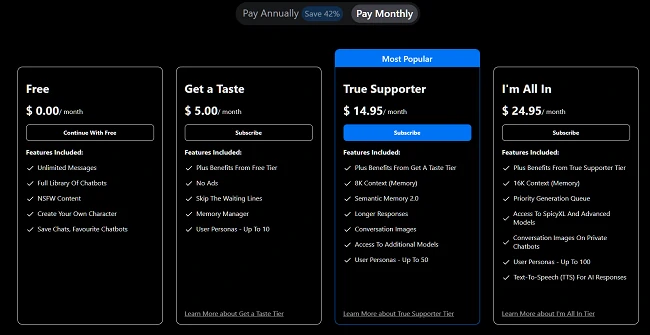
In-app purchases on Android are priced at $9.99 per week or $29.99 per year for specific unlock packages. These are distinct from the web subscription tiers ($5, $14.95, $24.95 per month) and are priced to align with Google Play's billing framework. If you already have a web subscription, log in with your existing account — the subscription status carries over.
How to Download SpicyChat AI on iOS
The iOS version is available through the Apple App Store under the name "SpicyChat AI: Roleplay Chat."
- Current version: 1.0.72
- Last updated: February 2026
- Developer: NextDay AI Incorporated
Step-by-step download process:
- Open the Apple App Store on your iPhone or iPad
- Search for "SpicyChat AI" or "SpicyChat AI: Roleplay Chat"
- Verify the developer is NextDay AI before downloading
- Tap "Get" — the app is free to download
- Sign in with your existing account or create a new one
- Complete age verification if prompted
Apple's App Store review process applies additional content scrutiny to adult apps. The iOS version may have minor feature differences from Android and web due to App Store guidelines. In-app purchases are processed through Apple's billing system.
Using SpicyChat AI on Web (Browser)
The web experience at spicychat.ai is the most feature-complete access method and the one that receives updates first. New features — including the April 2026 multilingual support launch and group chat functionality — appeared on web before the mobile apps received corresponding updates.
PWA installation (Progressive Web App): On most modern mobile browsers, navigating to spicychat.ai and selecting "Add to Home Screen" (Safari on iOS) or tapping the install prompt (Chrome on Android) creates a home screen icon that opens the site in a full-screen app-like view. This is a practical alternative to the native app for users who prefer it, though it does not support push notifications.
Desktop users on Windows, macOS, or Linux access the full platform through any modern browser. There is no dedicated desktop application.
Ready to explore? SpicyChat AI offers free access to 138K+ characters.
Start Chatting Free →SpicyChat AI on now.gg
now.gg is a cloud gaming and app streaming platform that allows users to run Android apps in a browser environment without installing them locally. SpicyChat AI is accessible through now.gg, which serves users who cannot or prefer not to install the native Android app.
The now.gg experience runs the Android app version in a cloud environment. This means the feature set matches the Android app rather than the web version, which can differ in minor ways. Performance depends on internet connection quality and now.gg's server load.
Use cases for now.gg access: users on iOS who want the Android app interface, users on managed devices where app installation is restricted, and users who want to test the app experience before installing locally.
SpicyChat AI Mod APK — Warning
Our investigation found dozens of sites distributing what they describe as "SpicyChat AI Mod APK" files — modified Android installation packages claiming to unlock premium features, remove ads, or bypass subscriptions for free.
These claims are false. The findings from security analysis of similar AI platform mod APKs are consistent: the files contain one or more of the following:
- Adware: Aggressive advertising modules that operate silently in the background
- Spyware: Code that reads contact lists, SMS messages, and browsing history
- Account credential harvesters: Login screen overlays that capture your username and password
- Subscription scammers: Apps that install legitimate-looking interfaces but bill users for services they did not consciously authorize
SpicyChat AI's premium features are server-side: the SpicyXL large language model processes requests on NextDay AI's infrastructure, not on your device. A modified APK cannot "unlock" server-side processing that the server refuses to provide without a valid subscription. The mod APK claims are technically impossible — the premium features cannot exist in a local file.
Installing any unofficial APK also violates SpicyChat's terms of service and will result in account termination if detected.
The legitimate free alternative: SpicyChat's actual free tier is functionally competitive. Unlimited messages with a 4K context window and three user personas is a genuine offering, not a crippled demo. If the paid features are outside your budget, the free tier is the appropriate access method.
App Features vs Web Experience
| Feature | Android App | iOS App | Web Browser |
|---|---|---|---|
| Full character library | Yes | Yes | Yes |
| NSFW content (with toggle) | Yes | Yes (may have limits) | Yes |
| Push notifications | Yes | Yes | No (PWA: limited) |
| In-app purchases | $9.99/wk or $29.99/yr | App Store pricing | $5/$14.95/$24.95/mo |
| Multilingual support | Yes | Yes | Yes |
| Group chats | Yes (premium) | Yes (premium) | Yes (premium) |
| Offline access | No | No | No (AI requires internet) |
| Feature update timing | After web | After web | First |
Why Is SpicyChat AI Not on the App Store?
This question surfaces frequently in search data, but the premise is outdated. SpicyChat AI is on both major app stores as of 2026. The confusion likely originates from an earlier period when the platform was web-only, or from users in specific regions where the app may have limited visibility due to content age-rating restrictions.
App store policies for adult content platforms are strict: both Google Play and Apple App Store require developers to implement age verification and content gating before adult material is accessible. SpicyChat's use of AgeGO and VerifyMyAge, combined with the NSFW toggle requiring explicit opt-in, represents compliance with these requirements.
If you cannot find the app in your regional App Store, it may be because your account's age settings or regional content filtering affects search visibility for adult-rated apps. Ensure your app store account reflects your correct age.
Ready to explore? SpicyChat AI offers free access to 138K+ characters.
Start Chatting Free →Troubleshooting SpicyChat AI App Issues
Our review of community forums identified the most frequently reported technical problems and their documented solutions:
App not loading / blank screen: Force-close the app, clear the app cache (Settings → Apps → SpicyChat AI → Clear Cache on Android), and relaunch. If the problem persists, uninstall and reinstall from the official store.
Login not working: Check that your credentials match the email used during registration. If you signed up via web with a social login (Google/Apple), use the same method in the app. Password reset is available via the login screen.
App keeps crashing: Verify your Android version is 7.0 or higher (1.0.79 requirement). On iOS, ensure you are running a supported version. Force restart your device and attempt relaunch.
Messages not sending or duplicating: This is the most commonly reported functional bug. It typically reflects server load rather than a local app issue. Check SpicyChat's Discord community for real-time server status before extensive troubleshooting.
For persistent issues, SpicyChat's support contact is available through the in-app help section. Community Discord is typically faster for status information during outages.
FAQ
Yes — the SpicyChat AI app is free to download on both Android (Google Play) and iOS (App Store). The app itself has no purchase price. A functional free tier with unlimited messages is available without any payment. Premium subscriptions are available as in-app purchases: $9.99 per week or $29.99 per year on mobile, with pricing slightly different from the web subscription options ($5, $14.95, or $24.95 per month).
Largely, yes, with minor differences. Both the app and the website provide access to the full SpicyChat AI platform, the same character library, and the same subscription-based features. The web version at spicychat.ai typically receives feature updates before the mobile apps. In-app purchase pricing differs from web subscription pricing due to App Store billing framework requirements. The core functionality — character chat, NSFW content with toggle, character creation — is identical across platforms.
Yes. SpicyChat AI uses account-based sync. Log in with the same credentials on the app and the web, and your character history, subscription status, personas, and settings are preserved across devices. There is no manual sync required — the data is stored server-side and accessible from any login instance.
The most common causes are an outdated Android version (requires 7.0+), insufficient device storage, or server-side issues that manifest as app instability. Start by clearing the app cache (Android: Settings → Apps → SpicyChat AI → Clear Cache), then force-restart your device. If crashes persist, uninstall and reinstall the current version (1.0.79 on Android) from the official Play Store. Persistent crashing after reinstall may indicate a server-side incident — check the SpicyChat Discord for status updates.
No dedicated desktop application exists for Windows, macOS, or Linux. Desktop users access SpicyChat AI through a web browser at spicychat.ai, which is the full-featured platform. Chrome users can install the web app as a Progressive Web App (PWA) via the install icon in the address bar, creating a standalone window that behaves like a desktop app without a separate download.