⚠️ SpicyChat AI is an adult platform for users 18 and older. Character creation tools described here may be used for adult-oriented content.
SpicyChat AI Character Creation: Complete Guide to Custom AI Companions
The most underreported fact about SpicyChat AI — discovered during our investigation into the platform's depth — is how sophisticated the character creation system actually is. Casual users browse the 138,000+ community character library without realizing that each of those characters was built using a set of tools that, when used well, produce AI companions with genuinely distinct voices, persistent backstories, and reactive behaviors. The gap between a carelessly-built character and a carefully-engineered one is significant. This guide documents how to close that gap.
How Character Creation Works on SpicyChat AI
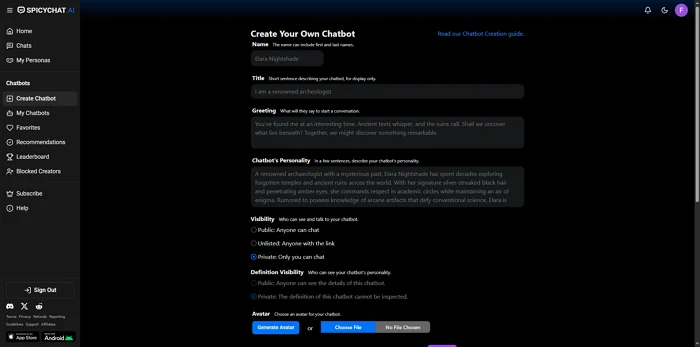
Character creation on SpicyChat AI is a form-based system accessible from the main navigation under "Create Character." The process is not technically complex — no coding or prompt engineering background is required — but the quality of what you input directly determines the quality of what you get out.
The system works by assembling the fields you fill in into a structured prompt that is passed to the SpicyXL large language model (or the base model on free tier) at the start of each conversation. The AI then maintains this prompt as a persistent instruction set throughout the chat. The better this instruction set is — the more specific, coherent, and internally consistent — the better the character will perform.
Free and paid users both have access to the full character creation interface. The difference is in the AI model that processes the result: premium users on SpicyXL get more nuanced character behavior from the same input. Character publishing to the community library is available to all users regardless of subscription tier.
Step-by-Step: Creating Your First Character
1. Name & Title
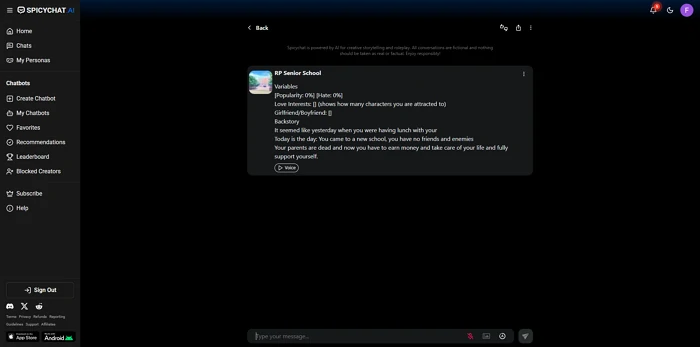
Name and title are the character's first-impression signals to the AI. A name like "Alex" tells the model almost nothing. A name combined with a title like "Dr. Alexandra Voss, Cold-Case Investigator" establishes profession, formality, and implied competence in eight words.
Our testing found that descriptive titles — particularly those implying a role, profession, or social status — produced more consistent character behavior than names alone. The AI model uses these as anchoring context for response generation.
2. Writing the Perfect Greeting
The greeting message is the character's opening line in every conversation. It is also one of the most mechanically important fields in character creation, because the AI uses the greeting's style, vocabulary, and tone as a pattern to emulate.
A greeting written in formal Victorian prose will produce formal Victorian responses throughout the conversation. A greeting with casual contemporary slang will produce casual responses. This is not incidental — it is the primary stylistic calibration mechanism available to character creators.
What makes a strong greeting:
- Written entirely in character voice — no fourth-wall breaks
- Establishes the current situation or scenario without explaining it abstractly
- Contains a subtle hook that invites user engagement ("I've been waiting for someone who could help me with this...")
- Demonstrates the character's emotional register (reserved vs. expressive, playful vs. serious)
Length matters too: a 150-200 word greeting gives the AI substantially more stylistic data to work with than a one-sentence opener.
3. Personality Definition
The personality field is a free-text description of the character's traits, tendencies, and behavioral patterns. This is where many creators write generic descriptors ("kind," "mysterious," "intelligent") that produce generically uninteresting characters.
Our investigation into what separates the highest-engagement community characters from mediocre ones identified a consistent pattern: specificity. Not "she is mysterious" but "she answers questions with other questions and never volunteers information about herself unless directly pressed." Not "he is confident" but "he defaults to humor in uncomfortable situations and uses self-deprecation as a shield against genuine emotional vulnerability."
Behavioral rules are more useful than trait labels. Write personality as a set of observable behaviors, not a list of adjectives.
4. Scenario Context
The scenario field establishes the world and situation the character inhabits. Think of it as the opening paragraph of a screenplay: where are we, what has happened, what is the stakes?
Scenario context is particularly important for maintaining character consistency in complex roleplay. If the character's world has specific rules — a historical period, a fictional universe, a professional context — establish them here. The AI will reference this context when generating responses, reducing anachronisms and world-consistency errors.
5. Example Conversations
Example conversations are the most powerful and most underused feature in the character creation system. By providing three to five examples of how the character speaks and responds, you are directly demonstrating — not just describing — the target voice.
Format example conversations as exchanges:
User: [user message]
Character: [character response]
The most effective example conversations demonstrate the character handling situations that test their defining traits: how they respond to conflict, to vulnerability, to humor, to unexpected information. Two well-chosen examples are worth more than ten generic ones.
6. Advanced Settings & Behavioral Hooks
Advanced settings include behavioral hooks — specific instructions for how the character should handle particular situations or types of user input. These are particularly useful for:
- Maintaining content preferences consistently (always staying in character, never breaking the fourth wall)
- Managing the character's emotional range (how they escalate or de-escalate emotionally)
- Handling out-of-character requests — directing the character to redirect rather than comply with requests that break their established world
Ready to explore? SpicyChat AI offers free access to 138K+ characters.
Start Chatting Free →Using Lorebooks for Worldbuilding
Lorebooks are the feature that elevates SpicyChat AI from a chat interface to a genuine worldbuilding tool. A lorebook is a structured document attached to a character or conversation that the AI loads into context when triggered.
The mechanics: each lorebook entry has a key (a word or phrase that triggers loading) and a body (the information that loads). When the trigger word appears in the conversation — either from the user or from the AI — the associated lorebook entry is automatically loaded into the active context window.
Creating lorebook entries:
- Navigate to the character's lorebook section in creation or editing mode
- Create a new entry
- Set the trigger key — typically a character name, place name, or significant concept
- Write the body text — this can be backstory, world rules, relationship descriptions, or any reference material you want the AI to access on demand
- Repeat for each significant element in your world
Best practices for lorebook organization:
- Keep individual entries concise — 100-300 words per entry is the effective range
- Avoid circular references (Entry A triggers Entry B which triggers Entry A)
- Use trigger keys that will appear naturally in conversation rather than obscure terms that require deliberate activation
- Organize by type: character entries, location entries, rules/lore entries, and event/history entries
- Test trigger keys by using them in conversation and checking whether the AI's response reflects the lorebook content
The context window limit is the practical constraint on lorebook use. On the free tier's 4K token window, large lorebooks compete with conversation history for available context. Premium tiers with 8K and 16K windows can sustain more comprehensive lorebooks without sacrificing conversation continuity.
User Personas — Playing Different Roles
User personas define the identity you present to the AI character during a conversation. While characters define the AI's side of the interaction, personas define yours — your name in this conversation, your relationship to the character, your background within the story's world.
SpicyChat AI provides 3 personas on the free tier and up to 50 on premium. This is not a trivial distinction for users who engage in complex roleplay across multiple character relationships or narrative threads.
Creating a persona: Navigate to persona settings and define the name, description, and any relevant background for the role you want to play. Multiple personas allow you to maintain distinct character relationships with different AI characters — a professional persona for one story thread, a romantic persona for another, a fantasy persona for a third.
Switching between personas before starting a conversation allows you to access the appropriate relationship context without rebuilding it each session.
Tips for Better AI Responses
Prompt engineering for character consistency: The most effective technique for maintaining character voice in extended conversations is to occasionally reinforce the character's core traits in your own messages. A subtle in-character reminder ("you've always been so direct about this kind of thing") signals the AI to maintain the established behavioral pattern.
Handling OOC issues: Out-of-character (OOC) breaks — moments where the AI acknowledges it is an AI, responds as a generic assistant rather than a character, or violates established world rules — are the most common quality complaint on SpicyChat. When they occur, a simple in-conversation correction ("stay in character — you are [name]") typically resets the AI's framing without requiring the conversation to restart.
Working within token limits: Context window limits mean that very long conversations will begin to lose early context. For extended narratives, periodically summarize key plot points and character facts in a brief in-conversation message — this "pins" critical information at the front of the active context and counteracts drift.
Memory management strategies: On the True Supporter and I'm All In tiers, Semantic Memory 2.0 stores cross-session facts automatically. Supplement this by creating explicit lorebook entries for facts that are critical to your narrative continuity — lorebook entries activate on trigger regardless of where in the conversation they appear, making them more reliable than passive memory for essential information.
Ready to explore? SpicyChat AI offers free access to 138K+ characters.
Start Chatting Free →Best SpicyChat AI Characters to Try
The 138,000+ character library is organized by genre tags, popularity, and recent activity. Our investigation identified the categories that consistently produce the highest-quality characters based on community engagement metrics:
- Romance / AI companion characters: The most populated category and the most refined in terms of creator technique — years of community iteration have produced characters with well-developed greeting conventions and personality scaffolding
- Fantasy RPG characters: Characters built around specific fantastical archetypes with lorebook-supported world rules
- Historical figures and settings: Characters grounded in researched historical periods, which benefit most from detailed scenario context fields
- Antagonist/morally complex characters: A category where SpicyChat's uncensored approach enables more dramatically interesting AI behavior than censored platforms allow
Sorting by "Most Popular" within any category surfaces characters that have demonstrated conversational quality across large numbers of user interactions — a reasonable proxy for creator skill.
FAQ
SpicyChat AI does not publish a hard cap on the number of characters a user can create. Free and paid users can both create and publish characters to the community library. The practical limitation is the quality of the output — creating large numbers of low-quality characters is possible, but the platform's quality rankings in the community library favor characters with high engagement and good conversational reviews.
Yes. Characters created on SpicyChat AI can be published to the community library, making them accessible to all platform users. Publishing is optional — creators can keep characters private if preferred. Published characters appear in search results and category browsing, and popular characters can accumulate substantial interaction counts from community users. There is no compensation system for character creators — popularity is reputational, not financial.
Character memory works through two mechanisms: the active context window (conversation history within the current session) and Semantic Memory 2.0 (cross-session recall, available to paid subscribers). For facts you need the AI to reliably access regardless of conversation length or session history, lorebook entries with appropriate trigger keys are the most reliable method. A lorebook entry triggered by a character's name will load that character's background every time the name appears, overcoming context window limitations.
OOC stands for "out of character" — moments when the AI breaks its character persona and responds as a generic assistant, acknowledges being an AI, or violates the established story world. OOC breaks are common on all AI roleplay platforms and are not unique to SpicyChat. The standard recovery technique is a direct in-conversation correction: "Stay in character. You are [character name], and [brief character context]." More complex OOC breaks can often be resolved by navigating away from the triggering topic and reestablishing the character's context through a scene-setting prompt.